はじめに
この記事では RemoteEvent と UnreliableRemoteEvent、RemoteFunction の違いや特徴、それらを使用する際の注意点などについて解説します。
この記事での Roblox Studio のバージョンは「Version 0.718.0.7181104 (64bit)」です。
この記事で解説するのは Remote~ 系のクラスについてですが、これと似た Bindable~ 系のクラスについての解説記事もあるので事前にこちらの記事を読んでおくことをオススメします。

使用用途
この記事で解説するクラスと同じようなクラスとしては BindableEvent や BindableFunction がありますが、これらはそのクライアント or サーバー内のスクリプト間で通信したいときに使用します。
この記事で解説するクラスはそれらとは違い、クライアント⇔サーバー間で通信したいときに使用します。
配置場所
この記事で解説するクラスは全て Instance の派生クラスであり、手動で Explorer 内に配置したり、Instance.new() でスクリプトからインスタンス化したりすることができます。
RemoteEvent と UnreliableRemoteEvent には BaseRemoteEvent という共通の親クラスがありますが、この記事の執筆時点(2026年4月時点)ではこのクラスで新たに定義されているメンバはありません。
公式ドキュメントで以下のように記載されている通り、RemoteEvent や UnreliableRemoteEvent、RemoteFunction はサーバーとクライアントの両方からアクセスできる場所に配置する必要があります。
In order to ensure both server and client access, it must be in a place where both sides can see it, such as ReplicatedStorage, although in some cases it’s appropriate to store it in Workspace or inside a Tool.
Remote events and callbacks
基本的には ReplicatedStorage に置くのですが、場合によっては Workspace や Tool 内に置く方が適切な場合もあります。
RemoteEvent
まずは RemoteEvent について解説します。
このクラスで新たに定義されているメンバは以下の5つです。
- OnClientEvent
- OnServerEvent
- FireAllClients()
- FireClient()
- FireServer()
基本的な使い方
基本的な使い方としては以下の3つのパターンがあります。
- クライアントからサーバーに送信する。
- サーバーから「特定の」クライアントに送信する。
- サーバーから「全ての」クライアントに送信する。
クライアント → サーバー
まずはクライアントからサーバーに送信する場合の例を見てみます。
今回使用する RemoteEvent のメンバは OnServerEvent と FireServer() です。
サーバーではログに「Hello World」と表示するという処理が書かれた関数を RemoteEvent に登録しています。
RemoteEvent.OnServerEvent に登録された関数はその RemoteEvent を発火した Player を第一引数で受け取れます。
-- サーバー

local ReplicatedStorage = game:GetService("ReplicatedStorage")
local remoteEvent = ReplicatedStorage.RemoteEvent

remoteEvent.OnServerEvent:Connect(function(player)
    print("Hello World")
end)
クライアントでは RemoteEvent:FireServer() で RemoteEvent を発火しています。
-- クライアント

local ReplicatedStorage = game:GetService("ReplicatedStorage")
local remoteEvent = ReplicatedStorage.RemoteEvent

remoteEvent:FireServer()
これらのコードが書かれた Script と LocalScript を適切な場所に置き、ReplicatedStorage 直下に「RemoteEvent」という名前の RemoteEvent を置きます。
その状態でゲームを実行するとサーバーのログに「Hello World」と表示され、クライアントからサーバーに送信できていることがわかります。
サーバー → 特定のクライアント
次はサーバーから特定のクライアントに送信する場合の例を見てみます。
今回使用する RemoteEvent のメンバは OnClientEvent と FireClient() です。
サーバーでは新たにプレイヤーが参加したら、その Player を RemoteEvent:FireClient() に渡して RemoteEvent を発火しています。
RemoteEvent:FireClient() の第一引数に渡す Player によって送信先の Player を指定しています。
-- サーバー

local ReplicatedStorage = game:GetService("ReplicatedStorage")
local Players = game:GetService("Players")

local remoteEvent = ReplicatedStorage.RemoteEvent

Players.PlayerAdded:Connect(function(player)
    remoteEvent:FireClient(player)
end)
クライアントではログに「Hello World」と表示するという処理が書かれた関数を RemoteEvent に登録しています。
RemoteEvent.OnClientEvent に登録された関数は Players.LocalPlayer でローカルプレイヤーを取得できるため、RemoteEvent.OnServerEvent のときのように Player を第一引数で受け取るわけではありません。
-- クライアント

local ReplicatedStorage = game:GetService("ReplicatedStorage")
local remoteEvent = ReplicatedStorage.RemoteEvent

remoteEvent.OnClientEvent:Connect(function()
    print("Hello World")
end)
これらのコードが書かれた Script と LocalScript を適切な場所に置き、ReplicatedStorage 直下に「RemoteEvent」という名前の RemoteEvent を置きます。
その状態でゲームを実行するとプレイヤーが参加するたび、そのプレイヤーのログに「Hello World」と表示され、サーバーから特定のクライアントに送信できていることがわかります。
サーバー → 全てのクライアント
最後はサーバーから全てのクライアントに送信する場合の例を見てみます。
今回使用する RemoteEvent のメンバは OnClientEvent と FireAllClients() です。
サーバーでは3秒待機した後、RemoteEvent:FireAllClients() で RemoteEvent を発火しています。
3秒待機しているのは検証用の全てのプレイヤーが参加し終わるのを待つためです。
RemoteEvent:FireClient() ではどのクライアントに送信するのかを指定するため、第一引数に Player を渡していましたが、RemoteEvent:FireAllClients() では全てのクライアントに送信することが決まっているため、Player を渡す必要はありません。
-- サーバー

local ReplicatedStorage = game:GetService("ReplicatedStorage")
local remoteEvent = ReplicatedStorage.RemoteEvent

task.wait(3)
remoteEvent:FireAllClients()
クライアントではログに「Hello World」と表示するという処理が書かれた関数を RemoteEvent に登録しています。
これは先ほどのサーバーから特定のクライアントに送信する場合と全く同じです。
-- クライアント

local ReplicatedStorage = game:GetService("ReplicatedStorage")
local remoteEvent = ReplicatedStorage.RemoteEvent

remoteEvent.OnClientEvent:Connect(function()
    print("Hello World")
end)
これらのコードが書かれた Script と LocalScript を適切な場所に置き、ReplicatedStorage 直下に「RemoteEvent」という名前の RemoteEvent を置きます。
その状態でゲームを実行すると3秒後に全てのプレイヤーのログに「Hello World」と表示され、サーバーから全てのクライアントに送信できていることがわかります。
特長
複数の値を引数で渡せる
これは後に解説する RemoteFunction にも共通する特徴ですが、「クライアント → サーバー」と「サーバー → 特定のクライアント」、「サーバー → 全てのクライアント」のいずれの場合においても複数の値を引数で渡すことができます。
なので、複数の値を引数で渡している以下のいずれの場合においても RemoteEvent を受信したサーバー or クライアントのログに「Hello World」と表示されます。
-- サーバー(「クライアント → サーバー」の場合)

local ReplicatedStorage = game:GetService("ReplicatedStorage")
local remoteEvent = ReplicatedStorage.RemoteEvent

remoteEvent.OnServerEvent:Connect(function(player, sampleParameter1, sampleParameter2)
    print(`{sampleParameter1} {sampleParameter2}`)
end)
-- クライアント(「クライアント → サーバー」の場合)
local ReplicatedStorage = game:GetService("ReplicatedStorage")
local remoteEvent = ReplicatedStorage.RemoteEvent
remoteEvent:FireServer("Hello", "World")-- サーバー(「サーバー → 特定のクライアント」の場合)
local ReplicatedStorage = game:GetService("ReplicatedStorage")
local Players = game:GetService("Players")
local remoteEvent = ReplicatedStorage.RemoteEvent
Players.PlayerAdded:Connect(function(player)
remoteEvent:FireClient(player, "Hello", "World")
end)-- クライアント(「サーバー → 特定のクライアント」の場合)
local ReplicatedStorage = game:GetService("ReplicatedStorage")
local remoteEvent = ReplicatedStorage.RemoteEvent
remoteEvent.OnClientEvent:Connect(function(sampleParameter1, sampleParameter2)
print(`{sampleParameter1} {sampleParameter2}`)
end)-- サーバー(「サーバー → 全てのクライアント」の場合)
local ReplicatedStorage = game:GetService("ReplicatedStorage")
local remoteEvent = ReplicatedStorage.RemoteEvent
task.wait(3)
remoteEvent:FireAllClients("Hello", "World")-- クライアント(「サーバー → 全てのクライアント」の場合)
local ReplicatedStorage = game:GetService("ReplicatedStorage")
local remoteEvent = ReplicatedStorage.RemoteEvent
remoteEvent.OnClientEvent:Connect(function(sampleParameter1, sampleParameter2)
print(`{sampleParameter1} {sampleParameter2}`)
end)発火側は登録された関数の完了を待てない
これは後に説明する RemoteFunction との大きな違いなのですが、「クライアント → サーバー」と「サーバー → 特定のクライアント」、「サーバー → 全てのクライアント」のいずれの場合においても RemoteEvent の発火側は登録された関数の完了を待つことができません。
以下の例では、発火側は発火直後に「Fired」とログに表示しています。
そして受信側は受信後、1秒待機した後に「Hello World」とログに表示しています。
もし、発火側が登録された関数の完了を待つのであれば、いずれの場合においても「Hello World → Fired」という順番でログに表示されるはずですが、実際は「Fired → Hello World」という順番でログに表示されます。
つまり、RemoteEvent を発火した側は、登録された関数の完了を待たずに次の処理に進んでいることがわかります。
-- サーバー(「クライアント → サーバー」の場合)

local ReplicatedStorage = game:GetService("ReplicatedStorage")
local remoteEvent = ReplicatedStorage.RemoteEvent

remoteEvent.OnServerEvent:Connect(function(player)
    task.wait(1)
    print("Hello World")
end)
-- クライアント(「クライアント → サーバー」の場合)
local ReplicatedStorage = game:GetService("ReplicatedStorage")
local remoteEvent = ReplicatedStorage.RemoteEvent
remoteEvent:FireServer()
print("Fired")-- サーバー(「サーバー → 特定のクライアント」の場合)
local ReplicatedStorage = game:GetService("ReplicatedStorage")
local Players = game:GetService("Players")
local remoteEvent = ReplicatedStorage.RemoteEvent
Players.PlayerAdded:Connect(function(player)
remoteEvent:FireClient(player)
print("Fired")
end)-- クライアント(「サーバー → 特定のクライアント」の場合)
local ReplicatedStorage = game:GetService("ReplicatedStorage")
local remoteEvent = ReplicatedStorage.RemoteEvent
remoteEvent.OnClientEvent:Connect(function()
task.wait(1)
print("Hello World")
end)-- サーバー(「サーバー → 全てのクライアント」の場合)
local ReplicatedStorage = game:GetService("ReplicatedStorage")
local remoteEvent = ReplicatedStorage.RemoteEvent
task.wait(3)
remoteEvent:FireAllClients()
print("Fired")-- クライアント(「サーバー → 全てのクライアント」の場合)
local ReplicatedStorage = game:GetService("ReplicatedStorage")
local remoteEvent = ReplicatedStorage.RemoteEvent
remoteEvent.OnClientEvent:Connect(function()
task.wait(1)
print("Hello World")
end)UnreliableRemoteEvent
次は UnreliableRemoteEvent について解説します。
UnreliableRemoteEvent で定義されているメンバの名前や型は RemoteEvent と全く同じであり、基本的な使い方も同じです。
しかし、「Unreliable(信頼性のない)」という名前からもわかるように UnreliableRemoteEvent は送信した全てのイベントが確実に相手に届くわけではありません。
また、送信した通りの順番で相手に届くとも限りません。
これらの特徴から、ダメージ処理やアイテムの購入、データの保存などの確実に処理したい場合や処理順が重要な場合には RemoteEvent を、エフェクトや弾丸の軌道表示、頻繁な位置の更新などの、少しズレていても問題ない場合や、最新の情報だけが反映されていればそれでいい場合などは UnreliableRemoteEvent を使用するのが推奨されています。
また、公式ドキュメントで以下のように記載されている通り、全ての通信を RemoteEvent で行うのではなく、UnreliableRemoteEvent も適切に使用することでネットワーク上のパフォーマンスが向上します。
These events trade ordering and reliability for improved network performance.
Remote events and callbacks
RemoteFunction
次は RemoteFunction について解説します。
このクラスで新たに定義されているメンバは以下の4つです。
- OnClientInvoke
- OnServerInvoke
- InvokeClient()
- InvokeServer()
RemoteFunction は RemoteEvent と似ていますが、登録された関数の戻り値を発火側が受け取れる点や、登録された関数の完了を発火側が待つことができる点などが RemoteEvent との大きな違いです。
基本的な使い方
基本的な使い方としては以下の2つのパターンがあります。
- クライアントからサーバーに送信し、サーバーからの戻り値をクライアントが受け取る。
- サーバーから特定のクライアントに送信し、そのクライアントからの戻り値をサーバーが受け取る。
クライアント → サーバー → クライアント
まずはクライアントからサーバーに送信し、サーバーからの戻り値をクライアントが受け取る場合の例を見てみます。
今回使用する RemoteFunction のメンバは OnServerInvoke と InvokeServer() です。
サーバーでは「Hello World」という文字列を返すという処理が書かれた関数を RemoteFunction に登録しています。
RemoteFunction.OnServerInvoke に登録された関数はその RemoteFunction を発火した Player を第一引数で受け取れます。
-- サーバー

local ReplicatedStorage = game:GetService("ReplicatedStorage")
local remoteFunction = ReplicatedStorage.RemoteFunction

remoteFunction.OnServerInvoke = function(player)
    return "Hello World"
endクライアントでは RemoteFunction:InvokeServer() を呼び出し、その戻り値をログに表示しています。
-- クライアント

local ReplicatedStorage = game:GetService("ReplicatedStorage")
local remoteFunction = ReplicatedStorage.RemoteFunction

local result = remoteFunction:InvokeServer()
print(result)
これらのコードが書かれた Script と LocalScript を適切な場所に置き、ReplicatedStorage 直下に「RemoteFunction」という名前の RemoteFunction を置きます。
その状態でゲームを実行するとクライアントのログに「Hello World」と表示され、クライアントとサーバー間で通信できていることがわかります。
サーバー → クライアント → サーバー
次はサーバーから特定のクライアントに送信し、そのクライアントからの戻り値をサーバーが受け取る場合の例を見てみます。
今回使用する RemoteFunction のメンバは OnClientInvoke と InvokeClient() です。
サーバーでは新たにプレイヤーが参加したら、その Player を RemoteFunction:InvokeClient() に渡し、その戻り値をログに表示しています。
RemoteFunction:InvokeClient() の第一引数に渡す Player によって送信先の Player を指定しています。
-- サーバー

local ReplicatedStorage = game:GetService("ReplicatedStorage")
local Players = game:GetService("Players")

local remoteFunction = ReplicatedStorage.RemoteFunction

players.PlayerAdded:Connect(function(player)
    local result = remoteFunction:InvokeClient(player)
    print(result)
end)
クライアントでは「Hello World」という文字列を返すという処理が書かれた関数を RemoteFunction に登録しています。
RemoteFunction.OnClientInvoke に登録された関数は Players.LocalPlayer でローカルプレイヤーを取得できるため、RemoteFunction.OnServerInvoke のときのように Player を第一引数で受け取るわけではありません。
-- クライアント

local ReplicatedStorage = game:GetService("ReplicatedStorage")
local remoteFunction = ReplicatedStorage.RemoteFunction

remoteFunction.OnClientInvoke = function()
    return "Hello World"
end
これらのコードが書かれた Script と LocalScript を適切な場所に置き、ReplicatedStorage 直下に「RemoteFunction」という名前の RemoteFunction を置きます。
その状態でゲームを実行するとサーバーのログに「Hello World」と表示され、クライアントとサーバー間で通信できていることがわかります。
特長・注意点
次は RemoteFunction の特徴や使用する際の注意点などについて解説します。
1つの関数のみを登録できる
RemoteFunction.OnClientInvoke と RemoteFunction.OnServerInvoke は RBXScriptSignal 型ではなく、関数型であるという特徴からもわかるように RemoteFunction は1つの関数のみを登録できます。
もし、複数の関数を RemoteFunction に登録した場合は最後に登録された関数のみが実行されます。
この点についてはこちらの記事に具体例が載っているので良ければご覧ください。
こちらの記事の解説は BindableFunction についてのものですが、RemoteFunction でもほぼ同じです。
発火側は登録された関数の完了を待つことができる
RemoteEvent では発火側は登録された関数の完了を待つことができませんでしたが、RemoteFunction では登録された関数の完了を待つことができます。
この点についてもこちらの記事に具体例が載っているので良ければご覧ください。
登録された関数の中で発生したエラーは発火側でも発生する
RemoteEvent に登録された関数を RemoteEvent:Fire~() で発火し、その関数の中で何かエラーが発生したとしても RemoteEvent の発火側ではエラーは発生しません。
しかし、RemoteFunction では発火側でもエラーが発生します。
例えば以下のコードはサーバーから特定のクライアントに送信し、そのクライアントからの戻り値をサーバーが受け取るものですが、クライアントが RemoteFunction に登録する関数の中で Instance.new() に「Hello」という不正な文字列を渡しています。
-- サーバー

local ReplicatedStorage = game:GetService("ReplicatedStorage")
local Players = game:GetService("Players")

local remoteFunction = ReplicatedStorage.RemoteFunction

players.PlayerAdded:Connect(function(player)
    local result = remoteFunction:InvokeClient(player)
    print(result)
end)
-- クライアント
local ReplicatedStorage = game:GetService("ReplicatedStorage")
local remoteFunction = ReplicatedStorage.RemoteFunction
remoteFunction.OnClientInvoke = function()
Instance.new("Hello")
return "Hello World"
endこれらのコードが書かれた Script と LocalScript を適切な場所に置き、ReplicatedStorage 直下に「RemoteFunction」という名前の RemoteFunction を置きます。
その状態でゲームを実行するとサーバーでもクライアントでも「Unable to create an Instance of type “Hello”」というエラーが発生します。
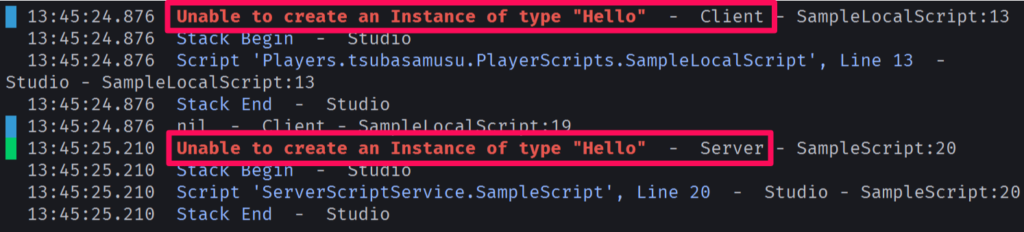
クライアントからの応答を待っている間にクライアントの接続が切れるとエラーが発生する
「クライアントは居るけどサーバーが途中で居なくなった」という状況はあり得ませんが、「サーバーは居るけどクライアントが途中で居なくなった」という状況は起こり得ます。
なので、サーバーから特定のクライアントに送信し、そのクライアントからの戻り値をサーバーが受け取る場合において、クライアントからの応答をサーバーが待っている間にクライアントの接続が切れると「Player Player1 disconnected during remote call to ReplicatedStorage.RemoteFunction」というエラーが発生します。
なので、RemoteFunction:InvokeClient() を呼び出す際は以下のコードのように pcall() を使用するなどして適切にエラーハンドリングする必要があります。
-- サーバー

local ReplicatedStorage = game:GetService("ReplicatedStorage")
local Players = game:GetService("Players")

local remoteFunction = ReplicatedStorage.RemoteFunction

Players.PlayerAdded:Connect(function(player)
    local success, result = pcall(remoteFunction.InvokeClient, remoteFunction, player)
end)
値やオブジェクトの受け渡しについて
RemoteEvent や UnreliableRemoteEvent、RemoteFunction で値やオブジェクトを受け渡しする際にいくつか注意点があるのでまとめておきます。
まずは以下の3つについてです。
- テーブルに設定されているメタテーブルは転送中に消えてしまう。
- テーブルにある、文字列ではない(stirng 型ではない)Key は転送中に文字列(string 型)に変換される。
- 配列(Key が number 型である要素)と連想配列(Key が number 型以外の要素)が混在しているテーブルは転送中に連想配列部分が削除されてしまうことがある。
これらはどれもテーブルを受け渡しする際の注意点であり、こちらの記事の最後の方にこれらの具体例が載っているので良ければご覧ください。
関数は受け渡しできない
サーバーとクライアント間では関数を受け渡しすることができません。
例えば以下のコードではサーバーとクライアント間で引数または戻り値で関数を受け渡しし、その結果をログに表示しています。
-- サーバー

local ReplicatedStorage = game:GetService("ReplicatedStorage")
local Players = game:GetService("Players")

local remoteEvent = ReplicatedStorage.RemoteEvent
local remoteFunction = ReplicatedStorage.RemoteFunction

remoteEvent.OnServerEvent:Connect(function(player, sampleFunction)
    print(`RemoteEvent.OnServerEvent: {sampleFunction}`)
end)

remoteFunction.OnServerInvoke = function(player, sampleFunction)
    print(`RemoteFunction.OnServerInvoke: {sampleFunction}`)
    return function() end
end

Players.PlayerAdded:Connect(function(player)
    remoteEvent:FireClient(player, function() end)

    local sampleFunction = remoteFunction:InvokeClient(player, function() end)
    print(`RemoteFunction:InvokeClient(): {sampleFunction}`)
end)
-- クライアント
local ReplicatedStorage = game:GetService("ReplicatedStorage")
local remoteEvent = ReplicatedStorage.RemoteEvent
local remoteFunction = ReplicatedStorage.RemoteFunction
remoteEvent.OnClientEvent:Connect(function(sampleFunction)
print(`RemoteEvent.OnClientEvent: {sampleFunction}`)
end)
remoteFunction.OnClientInvoke = function(sampleFunction)
print(`RemoteFunction.OnClientInvoke: {sampleFunction}`)
return function() end
end
remoteEvent:FireServer(function() end)
local sampleFunction = remoteFunction:InvokeServer(function() end)
print(`RemoteFunction:InvokeServer(): {sampleFunction}`)これらのコードが書かれた Script と LocalScript を適切な場所に置き、ReplicatedStorage 直下に「RemoteEvent」という名前の RemoteEvent と、「RemoteFunction」という名前の RemoteFunction を置きます。
その状態でゲームを実行するとログには以下のように表示され、全ての場合において関数の受け渡しに失敗し、結果が nil になってしまっているのがわかります。
RemoteFunction.OnClientInvoke: nil
RemoteEvent.OnClientEvent: nil
RemoteFunction.OnServerInvoke: nil
remoteFunction:InvokeClient(): nil
RemoteEvent.OnServerEvent: nil
RemoteFunction:InvokeServer(): nil
サーバーまたはクライアントしかアクセスできない Instance は受け渡しできない
最後の注意点は、サーバーまたはクライアントしかアクセスできない Instance は受け渡しできないということです。
サーバーしかアクセスできない Instance とは、例えば ServerStorage 内の Instance などです。
そしてクライアントしかアクセスできない Instance とは、例えばクライアントが LocalScript でインスタンス化した Instance などです。
これらはもう一方からはアクセスできない Instance であるため、これらを受け渡ししようとすると nil になってしまいます。
例えば以下のコードでは ServerStorage 内の Instance や、クライアントがインスタンス化した Instance を引数または戻り値で受け渡しし、その結果をログに表示しています。
-- サーバー

local ReplicatedStorage = game:GetService("ReplicatedStorage")
local ServerStorage = game:GetService("ServerStorage")
local Players = game:GetService("Players")

local serverPart = ServerStorage.ServerPart

local remoteEvent = ReplicatedStorage.RemoteEvent
local remoteFunction = ReplicatedStorage.RemoteFunction

remoteEvent.OnServerEvent:Connect(function(player, clientPart)
    print(`RemoteEvent.OnServerEvent: {clientPart}`)
end)

remoteFunction.OnServerInvoke = function(player, clientPart)
    print(`RemoteFunction.OnServerInvoke: {clientPart}`)
    return serverPart
end

Players.PlayerAdded:Connect(function(player)
    remoteEvent:FireClient(player, serverPart)

    local clientPart = remoteFunction:InvokeClient(player, serverPart)
    print(`RemoteFunction:InvokeClient(): {clientPart}`)
end)
-- クライアント
local ReplicatedStorage = game:GetService("ReplicatedStorage")
local Workspace = game:GetService("Workspace")
local clientPart = Instance.new("Part")
clientPart.Parent = Workspace
local remoteEvent = ReplicatedStorage.RemoteEvent
local remoteFunction = ReplicatedStorage.RemoteFunction
remoteEvent.OnClientEvent:Connect(function(serverPart)
print(`RemoteEvent.OnClientEvent: {serverPart}`)
end)
remoteFunction.OnClientInvoke = function(serverPart)
print(`RemoteFunction.OnClientInvoke: {serverPart}`)
return clientPart
end
remoteEvent:FireServer(clientPart)
local serverPart = remoteFunction:InvokeServer(clientPart)
print(`RemoteFunction:InvokeServer(): {serverPart}`)これらのコードが書かれた Script と LocalScript を適切な場所に置き、ReplicatedStorage 直下に「RemoteEvent」という名前の RemoteEvent と、「RemoteFunction」という名前の RemoteFunction を、ServerStorage 直下に「ServerPart」という名前の Part を置きます。
その状態でゲームを実行するとログには以下のように表示され、全ての場合において Instance の受け渡しに失敗し、結果が nil になってしまっているのがわかります。
RemoteFunction.OnClientInvoke: nil
RemoteEvent.OnClientEvent: nil
RemoteFunction.OnServerInvoke: nil
remoteFunction:InvokeClient(): nil
RemoteEvent.OnServerEvent: nil
RemoteFunction:InvokeServer(): nil
ちなみに先ほどのコードの serverPart と clientPart にそれぞれ ReplicatedStorage 内の Instance を代入すると nil になることなく、正常に受け渡しすることができます。